What is default gateway? A default gateway is usually your router’s IP address and acts as the main exit point between your local network and the internet. If you have ever searched “what is default gateway” after losing internet access, the short answer is simple: it is the device your computer relies on whenever it needs to reach websites, streaming services, games, or anything outside your home network.
Without a working default gateway, your computer may still appear connected to Wi-Fi while having no actual internet access. That confuses a lot of people because the network icon still looks normal. Computers are surprisingly good at pretending everything is fine right before refusing to load a single webpage.
Why Every Device Needs a Default Gateway
Understanding what is default gateway becomes easier once you think of your router as a traffic director.
When your device wants to open YouTube, load Reddit, or connect to an online game, it first checks whether the destination is inside your local network. If not, the traffic gets forwarded to the default gateway, which then sends it through your ISP and out to the wider internet.
Every internet-connected device in your home depends on this process:
- Laptops
- Phones
- Smart TVs
- Gaming consoles
- Smart home devices
That is why losing the gateway instantly breaks internet access across apps and browsers.
What Is the Default Gateway IP Address?
In most homes, the default gateway IP address is one of these:
| Router Brand | Common Gateway IP |
|---|---|
| TP-Link | 192.168.0.1 |
| Netgear | 192.168.1.1 |
| ASUS | 192.168.1.1 |
| Xfinity | 10.0.0.1 |
| AT&T | 192.168.1.254 |
These addresses belong to the router, not the internet itself.
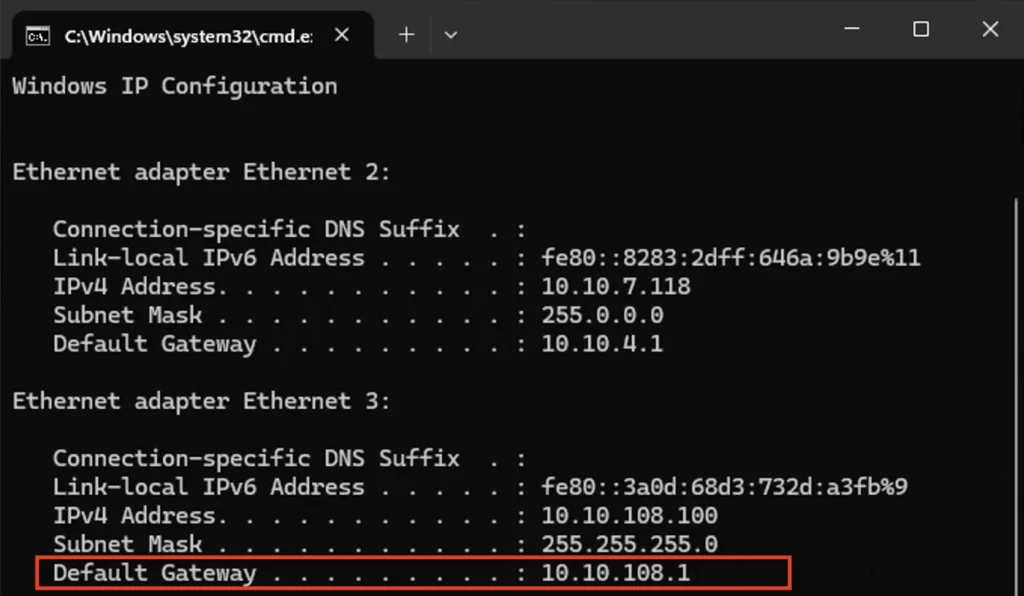
If you want to check your current gateway on Windows:
- Press
Win + R - Type
cmd - Run:
ipconfigLook for the line labeled Default Gateway under your active network adapter.
Learning what is default gateway helps a lot during troubleshooting because it immediately tells you whether your computer can still communicate with the router.
Default Gateway Not Available: What the Error Actually Means
The “Default Gateway Not Available” error means Windows can no longer reach the router correctly.
This usually happens because:
- Network drivers become unstable
- TCP/IP settings get corrupted
- Power-saving settings disable the adapter
- DHCP fails to assign network settings correctly
- The router temporarily glitches
In some cases, the gateway field may appear blank or show 0.0.0.0 when running ipconfig /all.
You can also test whether the gateway responds by using:
ping 192.168.1.1Replace the address with your actual gateway IP.
If the ping fails repeatedly, the computer and router are no longer communicating properly.
Quick Fixes That Solve the Problem Fast
Most gateway problems can be fixed in under 10 minutes.
Restart Your Router and PC
This sounds overly simple, but it works surprisingly often.
Unplug the router and modem for about 30 seconds, reconnect them, then restart the computer. Temporary routing failures and DHCP glitches frequently disappear after a reboot.
Reset the TCP/IP Stack
Corrupted networking settings are one of the most common causes behind this error.
Open Command Prompt as Administrator and run:
netsh winsock resetnetsh int ip resetipconfig /flushdnsipconfig /releaseipconfig /renewRestart the computer afterward.
Anyone researching what is default gateway eventually runs into these commands because they reset the networking stack Windows uses to communicate with the router.
Disable Power Saving for the Network Adapter
Windows sometimes disables network adapters aggressively to save power, especially on laptops.
To disable this:
- Open Device Manager
- Expand Network adapters
- Right-click your adapter
- Open Properties
- Go to Power Management
- Uncheck:
Allow the computer to turn off this device to save powerThis fixes many random disconnects that happen after sleep mode or inactivity.
Update or Reinstall Network Drivers
Outdated drivers can interrupt communication between Windows and the router.
Inside Device Manager:
- Right-click the adapter
- Choose Update driver
If that fails, uninstall the adapter completely and reboot. Windows usually reinstalls the correct driver automatically.
Default Gateway vs DNS vs Subnet Mask
People often confuse these networking terms because Windows throws them all into the same settings screen like ingredients dumped into one bowl.
Here is the simple version:
| Setting | Purpose |
|---|---|
| Default Gateway | Sends traffic outside your local network |
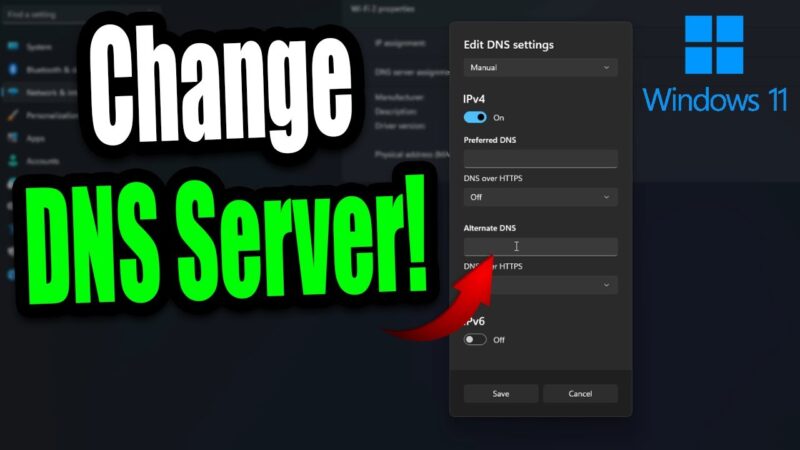
| DNS Server | Converts website names into IP addresses |
| Subnet Mask | Defines your local network boundary |
If DNS fails, websites stop loading by name but the gateway may still work.
If the default gateway fails, the entire internet connection breaks because the device no longer knows where to send outbound traffic.
Understanding what is default gateway makes these differences much easier to understand during troubleshooting.
Can You Have Multiple Default Gateways?
Technically yes, but usually across different network adapters.
For example:
- Wi-Fi adapter → one gateway
- Ethernet adapter → another gateway
Windows assigns priorities using interface metrics. Lower metric values get preferred automatically.
Most home users never notice this unless both Ethernet and Wi-Fi stay connected simultaneously.
How to Prevent Gateway Problems
Most default gateway issues come from unstable drivers, aging routers, or power management settings.
A few habits help prevent recurring problems:
- Keep Windows updated
- Restart the router occasionally
- Avoid outdated network drivers
- Disable aggressive power-saving settings
- Replace old routers that randomly disconnect devices
If multiple devices lose internet at the same time, the router or ISP is usually the real problem rather than the computer itself.
And honestly, that is usually the better outcome. Replacing a router is annoying, but debugging Windows networking at 1 AM feels like negotiating with haunted plumbing.
Conclusion
Once you understand what is default gateway, network errors become much less intimidating.
Your default gateway is simply the router address your device uses to reach the internet. When Windows says “Default Gateway Not Available,” it usually means communication between the computer and router has failed temporarily because of drivers, TCP/IP corruption, DHCP problems, or power settings.
In most cases, restarting the router, resetting the networking stack, or reinstalling the adapter driver fixes the issue quickly. And once you know what is default gateway, troubleshooting internet problems becomes far less mysterious than Windows likes to make it seem.