Auto MDI-X: The Feature That Made Crossover Cables Obsolete
Auto MDI-X is an Ethernet feature that automatically detects whether a straight-through or crossover cable is required and adjusts the connection internally without user intervention. Before this technology became common, using the wrong cable type between two devices resulted in a completely dead connection with no warning or error message. Modern Ethernet ports solved this problem by intelligently reconfiguring transmit and receive pairs automatically.
Today, this capability is built into virtually every Gigabit Ethernet device, which means crossover cables are no longer necessary for modern networking hardware. This guide explains how the feature works, which devices support it, and the rare situations where a crossover cable may still matter.
What Problem Did It Solve?
Traditional Ethernet ports were classified as either MDI (Medium Dependent Interface) or MDI-X (MDI Crossover). Computers and routers typically used MDI ports, while switches and hubs used MDI-X ports.
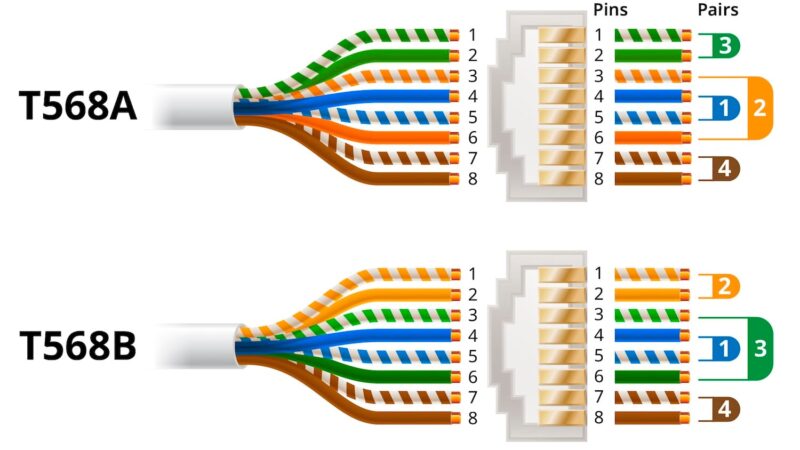
When connecting different device types, such as a computer to a switch, a standard straight-through cable worked correctly because the transmit and receive pairs were already aligned. However, connecting identical device types required a crossover cable to swap those signal pairs manually.
This caused constant confusion in early networking environments. If the wrong cable was used, the link simply failed with no visible explanation. Automatic pair detection eliminated that issue entirely by allowing ports to configure themselves regardless of cable type.
How It Works
When two compatible Ethernet ports establish a connection, they exchange signals during link negotiation. Each side checks whether the incoming signal is arriving on the expected wire pair.
If the transmit and receive pairs are reversed, the hardware automatically remaps the connection internally. This process happens within milliseconds and is completely transparent to the user.
In practice, it means you can plug almost any Ethernet cable into almost any modern device and expect the link to work immediately. Humanity finally engineered a solution to one of its own completely avoidable wiring problems. Miraculous.
Which Devices Support It?
Support became standard with IEEE 802.3ab Gigabit Ethernet hardware in 1999. Any Gigabit switch, router, or network adapter manufactured after roughly 2000 almost certainly includes automatic pair detection.
Most Fast Ethernet (100 Mbps) devices from major vendors also support it, although it was not originally mandatory at that speed.
Today, essentially all consumer networking equipment includes this functionality, including:
- Routers
- Switches
- Desktop network adapters
- Laptop Ethernet ports
- Smart TVs
- Gaming consoles
- Access points
How to Check Support
Managed Switches
Log into the switch management interface and inspect the port configuration settings. Many enterprise switches list the option as:
- Auto MDI-X
- Auto MDIX
- Automatic crossover detection
Windows PCs
Open:
- Device Manager
- Network Adapters
- Your Ethernet adapter
- Advanced tab
If the adapter includes an Auto MDI/MDI-X option, the feature is supported.
Consumer Devices
For unmanaged switches or home routers, check the manufacturer specification page or product manual.
Gigabit Ethernet and Crossover Cables
Gigabit Ethernet (1000BASE-T) uses all four wire pairs simultaneously for bidirectional communication. Because of this architecture, automatic pair correction became mandatory under the IEEE standard.
As a result, crossover cables have essentially no practical purpose in modern Gigabit networks.
If two modern devices fail to connect, the issue is almost never the cable type. It is usually a damaged cable, bad port, duplex mismatch, disabled interface, or some other delightful networking nonsense waiting to waste your afternoon.
When You Might Still Need a Crossover Cable
In modern environments, almost never.
The main exception involves older 10/100 hardware from the late 1990s or early 2000s that lacks automatic pair detection. When connecting two legacy devices directly, a crossover cable may still be required.
Signs a device may not support the feature include:
- No link light with a straight-through cable
- Successful connection only with a crossover cable
- Manufacturer documentation explicitly mentioning MDI/MDI-X limitations
Auto MDI-X Support by Device Type
| Device Type | Auto MDI-X Support | Notes |
|---|---|---|
| Gigabit switch (modern) | Yes — required by IEEE 802.3ab | All ports auto-configure |
| Gigabit router (modern) | Yes | All LAN ports supported |
| Laptop / desktop NIC (modern) | Yes | Gigabit adapters since ~2000 |
| Fast Ethernet switch (100 Mbps) | Usually yes | Check specs — not required by standard |
| Legacy 10/100 hardware (pre-2000) | Often no | May require crossover cable |
| Industrial / managed switches | Configurable per port | Can be disabled if needed |
Conclusion
This technology quietly eliminated one of the most frustrating Ethernet problems: perfectly functional cables that failed simply because transmit and receive pairs were reversed.
For virtually any networking device made within the last 15 to 20 years, cable type no longer matters. Plug it in, and the ports negotiate the connection automatically.
If you ever troubleshoot a stubborn Ethernet link on older or enterprise hardware, checking whether automatic crossover detection is disabled is still worth a quick look. Networking engineers spent decades inventing protocols sophisticated enough to run global infrastructure, yet people still lose entire afternoons because a port was manually forced to the wrong setting. Civilization remains consistent.