
This article is part of the complete Home Networking Guide — a single reference covering cables, hardware, IP addresses, and troubleshooting for home networks.
Your computer can talk to itself. Not in a weird way—this is actually a core part of how networks work. When something on your device needs to test a connection or send data internally, it uses a special shortcut instead of going out to the internet and back.
That shortcut is called a loopback address. If you’ve ever wondered what is a loopback address and why it matters, this is where it starts. By the end of this article, you’ll understand how 127.0.0.1 works, what localhost really means, and why this concept is essential for testing and troubleshooting.
What Is a Loopback Address?
A loopback address is an IP address that points back to your own device. Instead of reaching another computer, the data you send returns directly to where it started.
Think of it like writing yourself a note and placing it in your own mailbox. The message never leaves your house, but you can still read it as if it came through the normal delivery system.
The most common loopback IP address is 127.0.0.1, often called localhost. When you connect to it, your computer behaves as if it’s communicating over a network—but everything happens internally.
Here’s a simple example. If you type http://127.0.0.1 into your browser while running a local web server (like a WordPress site on your computer), your browser loads that site from your own machine instead of the internet.
What Is a Loopback Address and How 127.0.0.1 Works
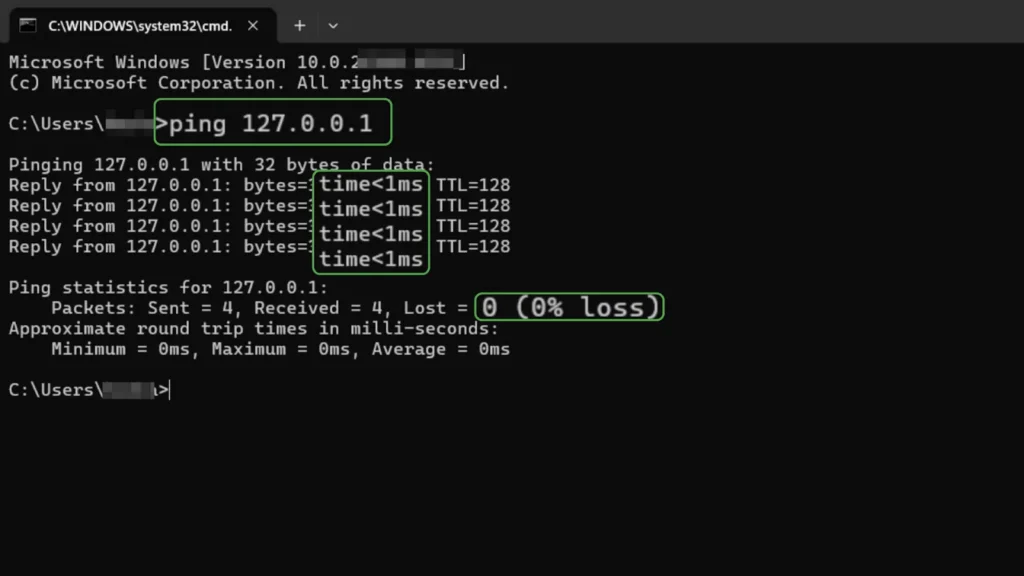
When your device sees a request to 127.0.0.1, it doesn’t send anything to your router or ISP. The operating system redirects that traffic back inside immediately.
This skips some low-level details, but here’s what actually matters: your system recognizes a reserved range of IP addresses meant only for internal use. The entire 127.0.0.0/8 block is reserved for loopback, but 127.0.0.1 explained simply is just the default address most systems use.
Modern operating systems like Windows, macOS, and Linux all handle this the same way. Even mobile devices do it, though you rarely see it directly.
One key detail: using a loopback IP address is faster than using your actual network IP. No Wi-Fi, no cables, no router—just internal communication handled by your system.
How Loopback Addresses Are Used in Real Life
Loopback addresses show up in more places than most people realize.
One common use is local development. For example, if you’re building a website with WordPress, your browser connects to 127.0.0.1, and WordPress connects to a local MySQL database—also through localhost. Everything happens inside your machine.
Another example is apps talking to local services. A desktop app might send requests to 127.0.0.1:3000 to interact with a local API running in the background.
There’s also a security use. Some services are configured to accept connections only from localhost. For example, a database might only allow access from your own device, blocking all external connections.
Here’s where things break: if a service is set to listen only on 127.0.0.1, your phone or another computer won’t be able to access it—even on the same Wi-Fi.
Why Loopback Works This Way
Networks need a reliable way to test communication without depending on external connections. The loopback system solves that.
When IP networking was designed, engineers reserved specific address ranges for special roles. Loopback is one of them. It acts as a built-in testing tool that always works, even if your internet is down.
This also helps isolate problems. If you can connect to 127.0.0.1 but not to a site like nytimes.com, the issue isn’t your app—it’s somewhere in your network or internet connection.
Here’s something most people don’t realize: loopback works even if your internet is completely disconnected. It never leaves your device.
To understand how your device communicates with other devices physically, see our guide on What Is Ethernet.
Benefits and Limitations of Loopback
A loopback address solves a very specific problem: testing connections without leaving your device.
It’s extremely fast because everything happens internally. There’s no external traffic, which makes it ideal for development and debugging.
It’s also safer. Services bound to localhost are not exposed to other devices unless you change the configuration.
But there are limits. A loopback IP address only works inside one device. You cannot use 127.0.0.1 to reach another computer.
This is why beginners often get stuck. If something works on localhost but not on another device, the issue is usually that it’s not listening on the network.
Loopback vs. 0.0.0.0
It’s easy to mix up 127.0.0.1 with 0.0.0.0, but they do opposite jobs. 127.0.0.1 sends traffic back to your own device. 0.0.0.0 is a meta-address that, when a service listens on it, means “accept connections on every network interface this device has,” including Wi-Fi and Ethernet.
That difference explains the problem from the section above. A service bound to 127.0.0.1 can only be reached from the same device. Bind it to 0.0.0.0 and other devices on your network can reach it too, using your device’s real IP address. The trade-off is exposure: anything listening on 0.0.0.0 is open to the whole network, so only use it when you actually want that.
Common Myths About Loopback Addresses
Some people think 127.0.0.1 is just another IP address. It’s not. It’s reserved specifically for internal communication, and your system treats it differently.
Another misconception is that localhost requires internet access. It doesn’t. Everything happens inside your device.
There’s also confusion between localhost and your actual IP address. Localhost always points to your own device, while your real IP connects you to other devices.
Why Should You Care?
Understanding what is a loopback address helps you troubleshoot faster and avoid common mistakes.
If something works on localhost but not online, your code is probably fine—the issue is your network, firewall, or configuration.
You’ll run into this when setting up local servers, APIs, or databases. Knowing how loopback works tells you exactly where to look when something fails.
FAQ
Why is 127.0.0.1 the default loopback address?
It’s part of a reserved range defined in early internet standards. While many addresses in the 127.x.x.x range exist, 127.0.0.1 became the default because it’s simple and supported everywhere.
Can I use something other than 127.0.0.1?
Yes. Other addresses in the 127.0.0.0/8 range also work as loopback. However, most tools expect 127.0.0.1, so using something else can cause issues.
What’s the difference between localhost and 127.0.0.1?
“Localhost” is a name, while 127.0.0.1 is the actual IP address. Your system maps localhost to 127.0.0.1 automatically. They usually behave the same, but localhost depends on system configuration.
Conclusion
Now you understand what is a loopback address and why 127.0.0.1 exists. It’s your device’s way of testing and communicating with itself without touching the network.
Once this clicks, debugging becomes easier and less frustrating. When something works locally but fails elsewhere, you’ll know exactly where to start looking.