The crossover cable vs patch cable debate comes up every time someone needs to connect two devices directly and gets it wrong. Both cables use the same RJ-45 connectors and look identical on the outside. The difference is entirely in how the eight internal wires are arranged at each end. Use the wrong one and you get zero signal, no error message, nothing.
This article is part of the complete Home Networking Guide — a single reference covering cables, hardware, IP addresses, and troubleshooting for home networks.
What Is a Patch Cable?
A patch cable (also called a straight-through cable) is the standard Ethernet cable used in virtually every home and office. It connects a device to a router, switch, or wall port. Both ends follow the same wiring standard, either T568A or T568B, so the transmit pins on one end connect to the transmit pins on the other.
This works because a switch or router internally crosses the signal paths. You connect your laptop to a switch, and the switch handles the routing.
What Is a Crossover Cable?
A crossover cable swaps the transmit and receive pairs between its two ends. One end follows T568A wiring and the other follows T568B. This internal swap allows two identical devices two computers, two switches to communicate directly without a switch in between.
It was the standard solution for direct device-to-device connections before Auto-MDI/MDIX made it obsolete. For the full technical breakdown, see our Crossover Cable Complete Guide. The wiring difference is documented in the IEEE 802.3 standard.
Crossover Cable vs Patch Cable: Side-by-Side Comparison
| Feature | Patch Cable | Crossover Cable |
|---|---|---|
| Wiring standard | Same on both ends (T568B–T568B) | Different ends (T568A–T568B) |
| Typical use | Device to switch/router | Device to device (direct) |
| Color coding | Any — usually gray or blue | Often red or yellow |
| Modern relevance | Essential — used everywhere | Rare — most NICs auto-detect |
| Works with a switch | Yes | No (signal conflict) |
| Price and availability | Widely available, cheap | Harder to find, slightly more |
How to Tell a Crossover Cable vs Patch Cable Apart Visually
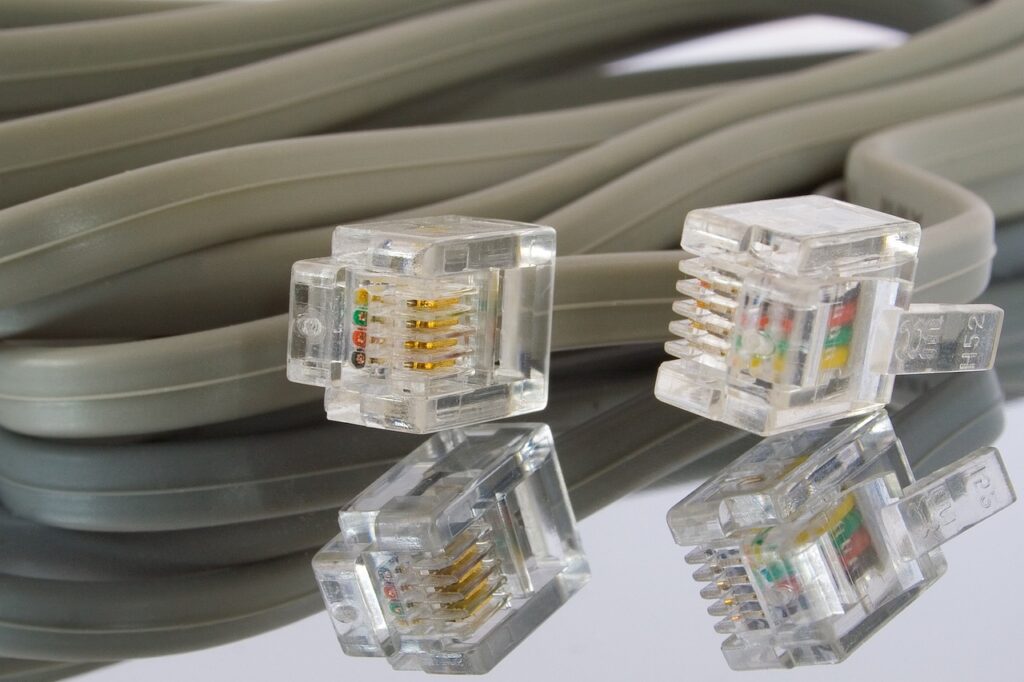
Hold both connectors side by side and look at the colored wires through the transparent RJ-45 plastic:
- Patch cable: Both ends have the same wire color sequence.
- Crossover cable: The color order differs between the two ends specifically, the orange pair and green pair are swapped.
If the wires are too thin to read clearly, a basic cable tester confirms it in under 10 seconds. A crossover cable will light up its LEDs in a non-sequential pattern that no patch cable ever would. See: How to Test an Ethernet Cable.
Do You Still Need a Crossover Cable?
Probably not. Since around 2000, most network interface cards and managed switches support Auto-MDI/MDIX, which detects cable type automatically and adjusts signal routing internally. The crossover cable vs patch cable choice is effectively irrelevant for any modern equipment.
The exceptions where you still need a crossover cable:
- Legacy networking equipment manufactured before Auto-MDI/MDIX was standard
- Industrial or embedded systems with older Ethernet hardware
- Certain managed switches that require explicit port configuration
Which One Should You Buy?
Buy a patch cable. For 99% of home and office scenarios connecting to a router, switch, NAS, desktop, smart TV, or game console a standard patch cable is the right answer. The crossover cable vs patch cable question only matters when you are deliberately connecting two identical devices directly on older hardware.
If you are unsure which type you already own, see our guide on T568A vs T568B wiring standards.
Common Mistakes When Using Crossover Cables
Even people who understand the crossover cable vs patch cable difference make these errors in practice:
- Using a crossover cable with a modern switch: Plugging a crossover cable between a computer and a switch causes a signal conflict. Auto-MDI/MDIX usually recovers, but on older equipment it produces a dead port with no error message just no connection.
- Assuming color means type: Red or yellow cables are commonly used for crossover, but there is no enforced standard. A red cable could be straight-through. Always verify by looking at the wire order or testing.
- Buying a crossover cable for a home network: If you are connecting any device to a router or switch, a patch cable is what you need. Crossover cables between a computer and a home router will appear to connect the link light may even turn on but data will not flow correctly on equipment that lacks Auto-MDI/MDIX.
- Confusing crossover with rollover cables: A rollover (console) cable also has different wiring at each end but is used for accessing router and switch CLI consoles it is not the same as a crossover Ethernet cable.
When Auto-MDI/MDIX Does Not Save You
Auto-MDI/MDIX is reliable but not universal. It does not help when:
- The device explicitly requires a crossover cable and Auto-MDI/MDIX is disabled in firmware
- You are working with 10BASE-T hardware from the 1990s
- Industrial PLCs or SCADA systems use older Ethernet chipsets without the feature
- You need to prove definitively which cable type you have only a tester or visual inspection confirms it
For most situations today, the practical answer to the crossover cable vs patch cable question is: buy a patch cable, and if something does not work, check the equipment specs before assuming you need a crossover.
Frequently Asked Questions
- What is the main difference in a crossover cable vs patch cable?
- The difference between a crossover cable vs patch cable is entirely in the internal wiring. A patch cable uses the same pin order at both ends. A crossover cable swaps the transmit and receive pairs between the two ends.
- Can I use a crossover cable instead of a patch cable?
- On modern equipment with Auto-MDI/MDIX, using a crossover cable vs patch cable makes no practical difference. On older equipment without that feature, using the wrong type means no connection at all.
- How do I tell a crossover cable vs patch cable apart?
- Hold both connectors side by side. If the wire color order is identical on both ends, it is a patch cable. If the orange and green pairs are swapped, it is a crossover cable.